

This article introduces Bandicam to you from various aspects, including its main features, pros, and cons. Meanwhile, it clarifies the question of is Bandicam safe and recommends a reliable alternative: MiniTool Screen Recorder.
Screen recording offers you many benefits. You can record online courses for later review, record meetings for transcription, and collect footage for video editing. However, not every screen recorders are safe to use, as it may contain some malware and lead to the dysfunction of your PC.
Among various recording software, Bandicam stands out due to its great popularity. Meanwhile, more and more people are worrying about is Bandicam safe to download. To help you find the answer to the question, the following content is written here.
What Is Bandicam
Available on Windows, Bandicam is an outstanding, lightweight screen recorder that enables you to record 4K UHD gameplay videos, webcams, and other external devices. Meanwhile, it provides you with various recording modes, including game recording, screen recording, and device recording. Moreover, Bandicam enables you to annotate the screen in real time.
However, Bandicam also has its shortcomings. For example, free-version Bandicam sets a 10-minute limit for the recording duration. In addition, you will see a watermark on the recorded video.
How to Use Bandicam to Capture Your Screen
Below is an in-depth guide on how to record the screen with Bandicam.
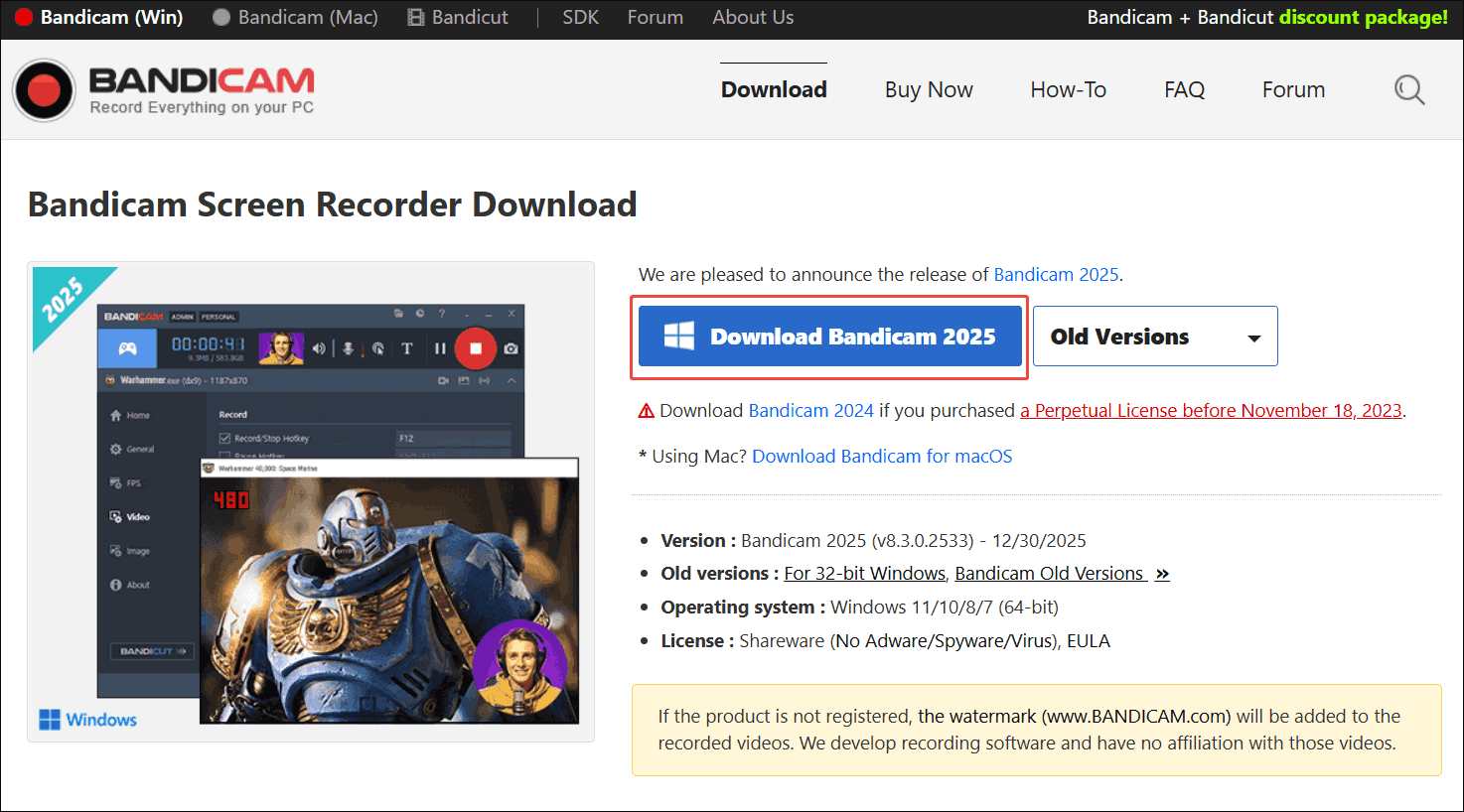
Step 1. Download and install Bandicam.
Go to https://www.bandicam.com/downloads/. Click on the Download button to download and install Bandicam on your PC.
Step 2. Manage the audio recording.
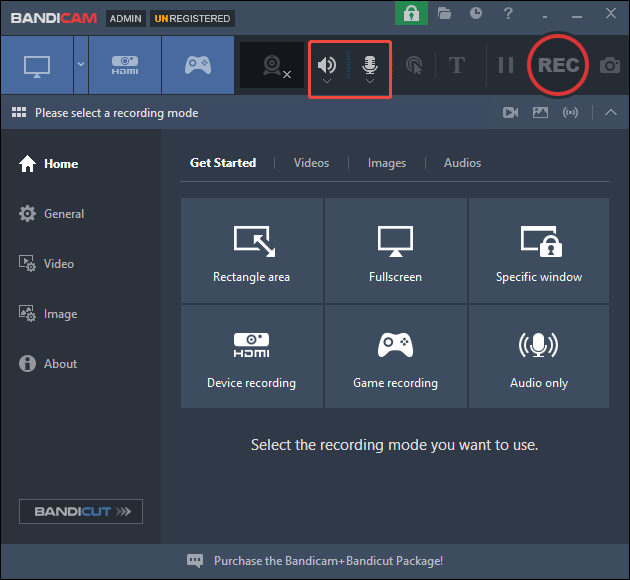
Click on the Loudspeaker icon and Microphone icon to set the audio device that you want to capture.
Step 3. Select the recording area.
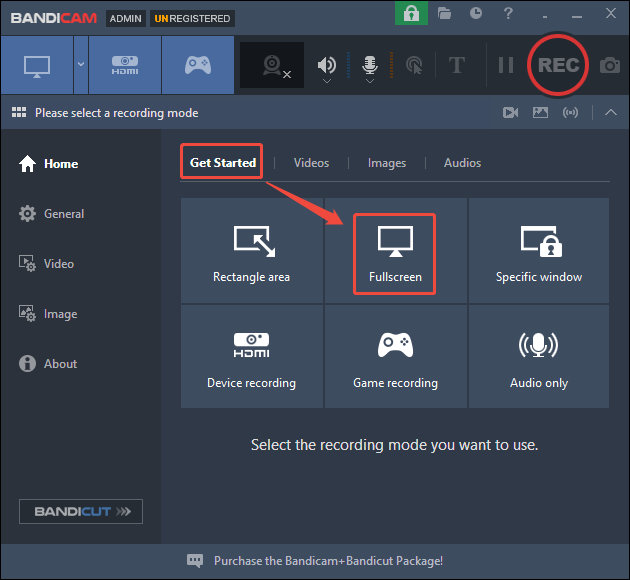
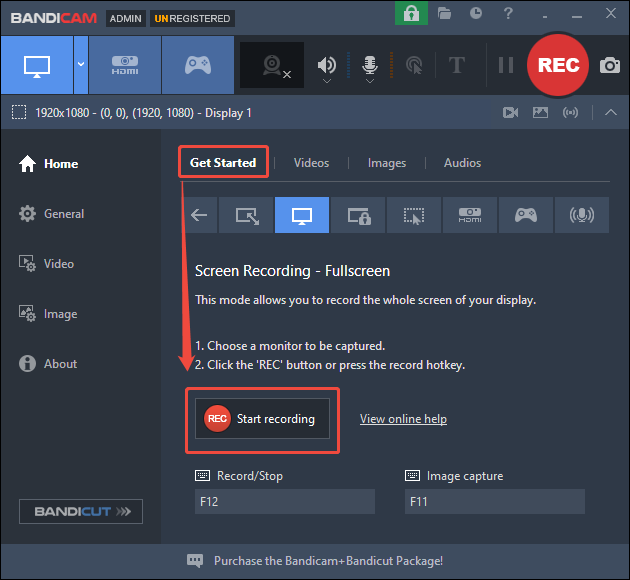
After launching Bandicam, choose a recording mode under the Get Started section. Here, I choose Fullscreen.
Step 4. Start/end the recording.
Click on the Start recording option to begin the recording process. Then, play the computer activity that you want to capture. When you have recorded what you want, press the F12 key to stop the recording.
Step 5. Check the output file.
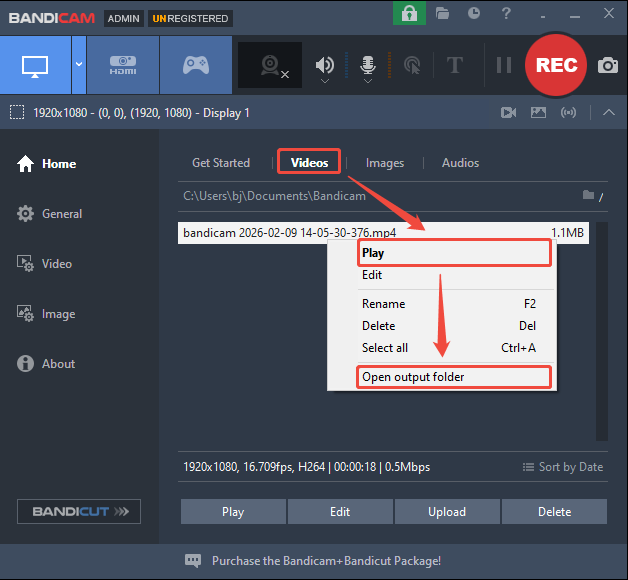
Switch to the Videos section. There, right-click on the recording file. If you want to view the recorded video, choose the Play option. To locate it, select the Open output folder option.
As you can see, Bandicam is a remarkable screen recorder that deserves a try.
Is Bandicam Safe
Is Bandicam safe to download? The answer depends on which version you are using. Specifically, if you download an official-version Bandicam, there isn’t any risk of viruses, spyware, or adware. However, on condition that you have gotten Bandicam from unofficial websites, you may be bothered by malware.
Is Bandicam free and safe? It is free to use. However, the safety of your Bandicam app depends on the download source you select. It is advisable to uninstall your Bandicam app and re-download it from an official source. If you are unable to ensure whether Bandicam is it safe, try a Bandicam alternative to finish the recording tasks.
![Discover the Best Timelapse Screen Recorders [6 Options]](https://images.minitool.com/recorder.minitool.com/images/uploads/2026/01/timelapse-screen-recorder-thumbnail.png)
The Best Alternative to Bandicam
Which Bandicam alternative to choose if Bandicam audio is not recording? It is suggested that you try MiniTool Screen Recorder, a feature-rich, easy-to-use screen recorder.
What Is MiniTool Screen Recorder
MiniTool Screen Recorder is a watermark-free video recorder application that doesn’t set any limit for the recording duration. In addition to screen recording, it also allows you to record the webcam and annotate your screen. Plus, MiniTool Screen Recorder never costs you a dime.
In essence, MiniTool Screen Recorder is an MP4 recorder, which ensures that you can share or edit the recordings effortlessly. To be accessible to novices, this screen recorder features an intuitive interface. In addition, MiniTool Screen Recorder provides many customizable options, including frame rate and recording quality.
MiniTool Screen Recorder also allows you to record sounds from the computer without hassle. At the same time, it enables you to record the full screen or customize the recording area based on your needs.
How to Capture Your Screen with MiniTool Screen Recorder
Below is a step-by-step guide on how to record your screen using MiniTool Screen Recorder.
Step 1. Download and install MiniTool Screen Recorder.
MiniTool Screen RecorderClick to Download100%Clean & Safe
Click on the download button above to download and install MiniTool Screen Recorder on your PC. Then launch this screen recorder.
Step 2. Choose the recording area and manage the audio recording.
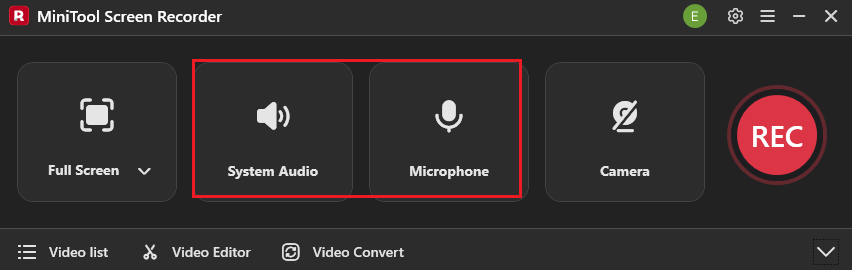
By default, MiniTool Screen Recorder will adopt a full-screen recording mode. If you want to select a specific recording area, press the Alt + R keys to make a choice. Next, click on the System Audio icon and the Microphone icon to turn on/off the recording of system and microphone sounds.
Step 3. Enable the webcam recording and configure other settings.
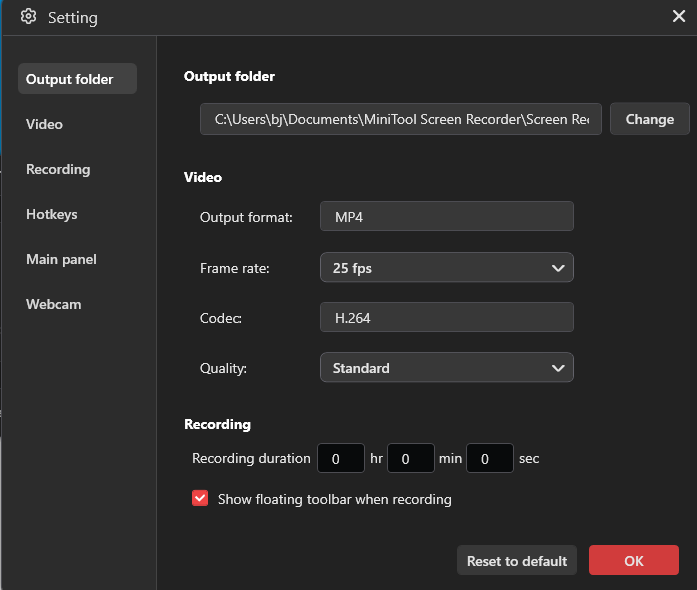
Enable the webcam recording by clicking on the Camera icon. Next, click on the upper-right Settings icon to access the Settings window.
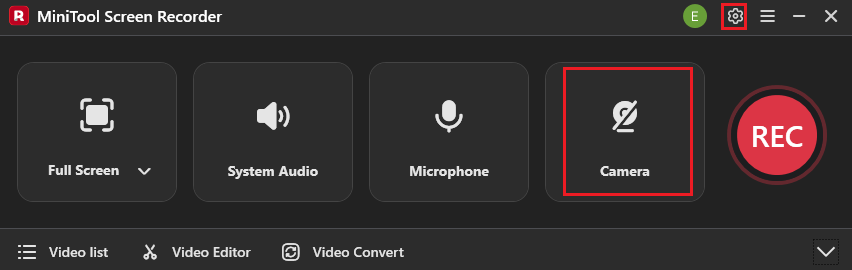
In the pop-up window, you can choose an output folder for the recording files. You are free to preset the recording duration. Meanwhile, you can customize the recording quality or frame rate based on your needs. Finally, click on the OK button to save the changes.
Step 4. Start/end the recording and check the output files.
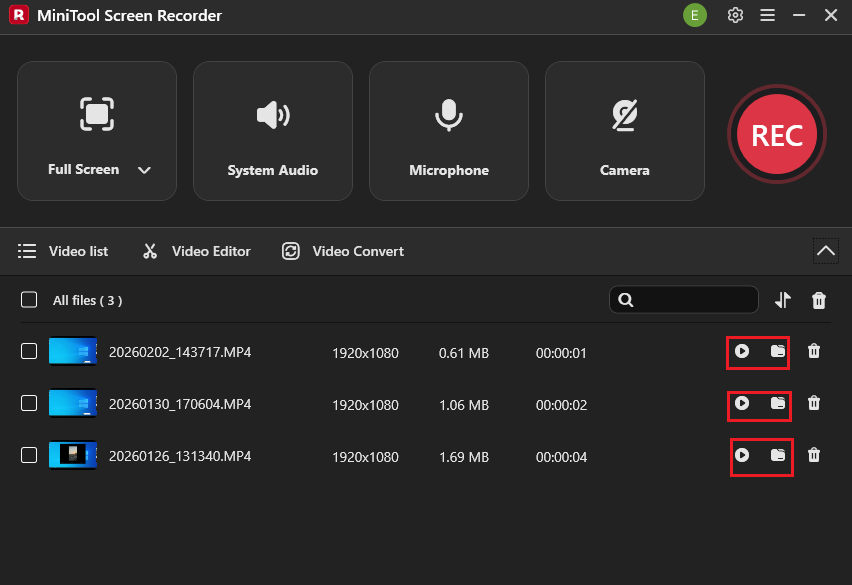
Begin the recording process by pressing the F6 key. After a 3-second countdown, start the computer activity that you want to record. When you have captured what you want, end the recording by pressing the F6 key. In the expanded file list, click on the Play icon to view the recorded videos. If you want to locate these videos, click on the Folder icon.
MiniTool Screen Recorder is a can’t-miss Bandicam alternative that you can try.Click to Tweet
If you can’t ensure how safe is Bandicam, you can try MiniTool Screen Recorder. With the detailed guidance above, it will never be difficult for you to capture your screen.
Final Verdict
Is Bandicam safe? The answer is yes if your Bandicam is an official version. Provided that you download Bandicam from unreliable sources, the Bandicam app is more likely to be unsafe. To avoid the potential risks from Bandicam, it is suggested that you try a watermark-free, no time-limit Bandicam alternative: MiniTool Screen Recorder.
If you are bothered by any problems when using MiniTool Screen Recorder, please ask for help by sending an email to support@minitool.com. Also, you can directly share your problems with me on X. I will help you as quickly as possible.