

The best bitrate for 60fps recording helps strike a balance between image quality and file size. This article outlines the best bitrate settings for various resolutions and recording scenarios, and recommends a screen recorder suitable for recording 60fps video.
When recording daily, I typically focus on how video resolution and frame rate affect quality, but I often overlook the role of bitrate. For instance, although I prefer recording at 60 fps, I have found no single fixed bitrate that suits that frame rate; instead, the optimal bitrate depends on factors like resolution and the specific recording scenario.
Quick Answer: What Is the Best Bitrate for 60FPS Recording
Testing reveals that there is no single optimal bitrate for 60fps recording. Determining the appropriate bitrate requires balancing the resolution, the specific recording scenario, and the desired image quality. However, as a general guideline, the following bitrate values for 60fps recording at various resolutions can be referred.
| Resolution | Recommend Bitrate |
| 720p 60fps | 5–8 Mbps |
| 1080p 60fps | 8-12 Mbps |
| 1440p 60fps | 16-24 Mbps |
| 4k 60fps | 25-60 Mbps |
What Is Bitrate
Bitrate (primarily referring to video bitrate in this article) refers to the number of bits transmitted per second, measured in bps. It typically affects video quality. Generally, a higher bitrate means more data is transmitted per second, retaining more detail and resulting in higher quality.
Conversely, a lower bitrate means less data is transmitted per second, potentially leading to blurriness and pixelation, thus lower quality. In other words, videos recorded at a high bitrate usually have clearer image quality.
Therefore, we can conclude that bitrate also affects file size. Higher bitrate videos retain more data, resulting in larger video files; lower bitrates retain less data, resulting in smaller files. In other words, the higher the bitrate, the larger the file, and the lower the bitrate, the smaller the file.
Does recording at 60FPS necessarily require a higher bitrate? The answer is yes. Because the higher the frame rate, the more frames appear continuously on the screen per unit of time, requiring more data to be encoded, thus necessitating a higher bitrate.
Best Bitrate for 60FPS Recording
There is no single "optimal" bitrate for 60 FPS recording; it depends largely on the resolution and the characteristics of the scene being recorded. Generally, higher resolutions require more data for encoding, and thus a higher bitrate. The following section lists recommended bitrate ranges for 60 FPS recording at various resolutions.
#1 720p 60FPS
Recommended bitrate: 5–8 Mbps
Videos recorded at 720p resolution typically involve smaller data volumes, so a high bitrate is unnecessary. Based on our testing, we recommend a bitrate setting of 5–8 Mbps. This range is ideal for recording static content, such as web browsers or PowerPoint presentations, and is particularly suitable for screen recording on lower-end computers.
Specifically, users can choose 5 Mbps for smaller file sizes or 8 Mbps for sharper image quality. Overall, we find that 720p video recorded at 60 FPS is excellent for playback on small-screen devices like smartphones and tablets.
#2 1080p 60FPS
Recommended bitrate: 8–12 Mbps
The best bitrate for recording 1080p 60fps is 8–12 Mbps. 1080p is a common resolution setting for most users, suitable for the vast majority of recording scenarios.
For instance, we have used these settings to record popular games, online meetings, and virtual classes, achieving crisp, sharp visuals on standard monitors. Furthermore, this bitrate strikes a good balance between video quality and file size.
#3 1440p 60FPS
Recommended bitrate: 16–24 Mbps
After testing, we recommend the best bitrate for 1440p 60fps recording is from 16 Mbps to 24 Mbps. 1440p captures more image detail than 1080p, thus requiring a higher bitrate. This is especially important for users with 2K monitors, as matching this bitrate range ensures more accurate reproduction of the original image quality.
Furthermore, we found this bitrate range to be an excellent choice for recording fast-paced games. However, this also results in larger video file sizes.
#4 4K 60FPS
Recommended bitrate: 25-60 Mbps
4K 60fps recording is ideal for users seeking cinematic image quality, as it delivers superior clarity and richer detail. We have determined that the optimal bitrate range for this resolution is 25–60 Mbps. For recording relatively static scenes, we recommend a bitrate of 25–30 Mbps; this ensures high quality while keeping file sizes manageable.
However, when capturing fast-paced content, such as gaming, live streams, or sports events, it is recommended to set the bitrate to 40–60 Mbps. Keep in mind that this results in larger files, requiring more disk space.
Which Screen Recorder Is Best for 60FPS Recording?
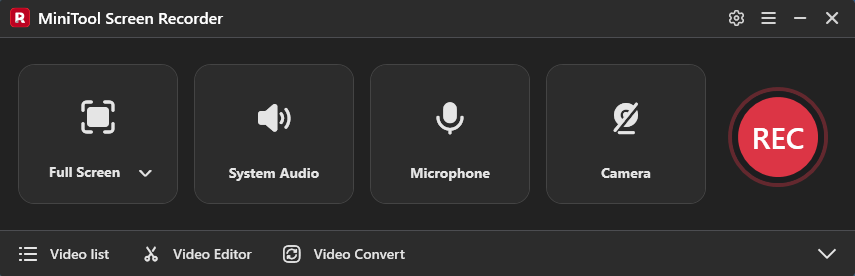
Choosing the right bitrate, resolution, and frame rate are some factors that affect high-quality video recording, but choosing the right recording tool is paramount. In our tests, we found that MiniTool Screen Recorder provides a smooth recording experience across various 60FPS recording scenarios.
This tool is not only free but also offers a variety of recording features. For example, it provides options to record a specific area of the full screen, a window, or multiple monitors, and also allows users to record webcam footage. Furthermore, the application's annotation tools are an excellent choice for recording instructional videos.
MiniTool Screen RecorderClick to Download100%Clean & Safe
Final Thoughts
Selecting the best bitrate for 60FPS recording is not simply about pursuing the highest possible bitrate. The suitable bitrate needs to be selected based on the resolution and the recording scenario. This post details the suitable bitrate ranges for 60FPS recording at 720p, 1080p, 1440p, and 4K resolutions, helping users find a suitable balance between video quality and file size.
If you have any questions when using MiniTool Screen Recorder, send an email to support@minitool.com.